The problem
Missed alerts cost you covers
MoonFishOps response
Get instant alerts when tables wait, stock runs low, or the kitchen reaches capacity.
Why MoonFishOps
The problem
MoonFishOps response
Get instant alerts when tables wait, stock runs low, or the kitchen reaches capacity.
The problem
MoonFishOps response
See sales, labor, food cost, and kitchen tickets live—on any device.
The problem
MoonFishOps response
Track every invoice, vendor, and inventory item before pressure hits your P&L.
Features
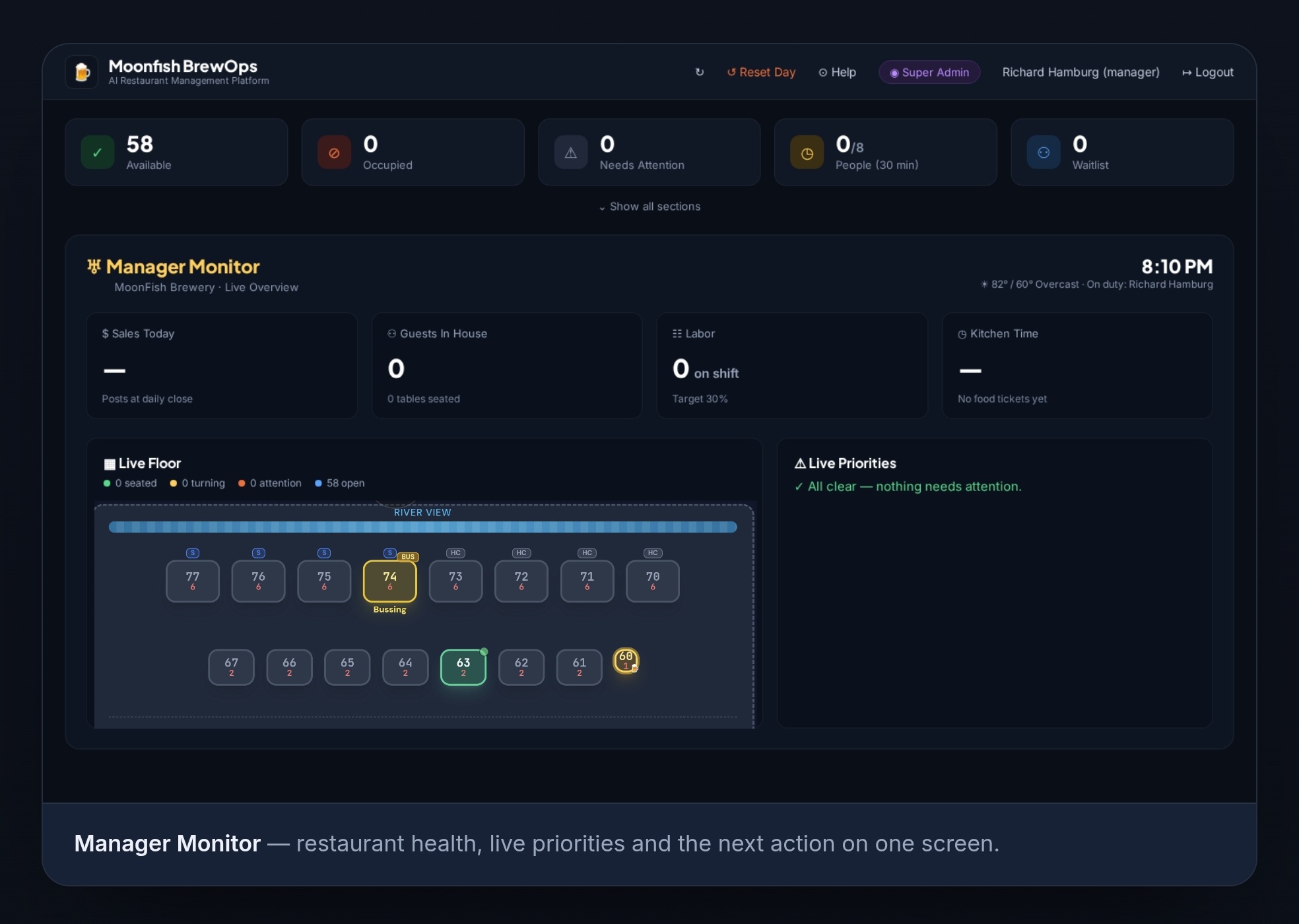
Real-time snapshot of guests served, open tickets, waitlist parties, staff clocked in, and food/labor cost — all on one screen. Updated live, no refresh needed.
Track active kitchen tickets and average ticket time against your goal. Spot slowdowns before they become complaints.
Track inventory levels, get low-stock alerts, manage vendor invoices, and see unpaid amounts at a glance. Know your costs before they know you.
See who's clocked in, scheduled shifts, and staff performance. Message the whole team or individuals directly from the dashboard.
Manage walk-ins, reservations, and waitlist parties in one place. Add to waitlist, seat guests, and track wait times effortlessly.
7-day performance trends for sales, labor %, food cost, and ticket time. Identify patterns and make smarter scheduling and menu decisions.
See It In Action
Watch how a single scan links invoices permanently — no re-entry, no spreadsheets, no mistakes.
AI-Powered Scheduling
Projected sales drive every staffing decision — so you never over-schedule on a slow Thursday or get caught short on a busy Saturday.
Three layers of data combine to give your managers a projection they can trust — before the week even starts.
Your actual past sales from Toast, Square, or any POS — analyzed by day of week going back 8–12 weeks to establish your baseline pattern.
Recent weeks count more than older ones. The "19 pts" shown next to each projection is how many historical data samples were used — more points means higher confidence.
Local weather forecasts, holidays like Summer Break, special events, and seasonal trends are all layered on top of your historical baseline.
Thursday shows sunny skies and 75°F — feels like a busy day, right? But the projection says $2,062 based on 19 data points. Your Thursdays are structurally slower mid-week, and good weather alone doesn't override that pattern. The manager in this demo recognized that and held off adding staff — saving labor cost without hurting service.
Table-Side QR Ordering
Optional table-side QR ordering for quiet shifts and surprise surges — a digital safety valve that's always available, never forced.
Keep a host scheduled and labor costs eat into thin margins. Cut the host and an unexpected surge creates slow service, stressed staff, and bad reviews before the first drink reaches the table. A simple table tent gives guests another way to get started.
The QR experience is available — never forced.
Guests select an available patio or dining-room table — based entirely on your settings.
They review drinks, food, and current specials without waiting for a menu.
Enable drinks, appetizers, or selected items while the server becomes available.
Guests who prefer traditional service can simply wait. The tech supports the team — it never replaces them.
Avoid unnecessary off-peak labor without leaving the room unprepared for a surprise rush.
Give willing guests a way to check in, sit, browse, and order while servers catch up.
Reduce arrival friction, protect reviews, and increase early first-round sales.
Check in. Start a tab. Stay connected.
Hospitality first. Technology second.
How It Works
Add your tables, staff, menu sections, and vendor list. Takes about 20 minutes.
Open the Monitor on any device. Your team clocks in, tickets flow, alerts fire automatically.
Use 7-day trends and MoonOps reports to tighten food cost, labor, and vendor spend.
The sidebar collapses with one tap — giving your floor team maximum screen space during the rush, and full navigation when they need it.
Expanded
Collapsed
Pricing
No hidden fees. Cancel anytime.
billed annually
For single-location restaurants
billed annually
Everything in Starter plus:
For multi-location groups
Testimonials
“We cut our food cost by 2 points in the first month just by actually seeing it every day on the monitor. Game changer.”
“MoonOps finally gave us visibility into our vendor invoices. I used to find out we were over budget at the end of the month. Now I know by Tuesday.”
“The collapsible sidebar is brilliant. During service we go full-screen on the table map. After service we open the nav and dig into reports.”
No credit card required. Set up in under 30 minutes.